
Data search and download API
Use this API to find and download EPISODES Platform data from your own scripts or command-line tools. You can search for seismic catalogues, waveform recordings and other files from the Platform's episodes, then download them for analysis on your local machine.
To find and download data:
- Find available search values, such as episode codes and data types.
- Search for files using those values and review the returned descriptions.
- Download a selected file using its download URL or identifier.
All three operations use HTTP GET. Their base URL is:
text
https://episodesplatform.eu/api/eposAuthentication and access to data
You can check available search values and search for files without supplying a token. These requests are anonymous: they do not identify your EPISODES Platform account.
When you supply a valid access token, the API identifies your account and uses its resource permissions. Your confirmed project affiliations or researcher status may give you access to additional data. A token identifies you; it does not itself grant an affiliation or researcher status. See Affiliations and researcher status for how to request these permissions.
Downloading a file always requires a token, including when the file does not require an affiliation or researcher status.
Obtain an access token
- Sign in to the EPISODES Platform using the account whose permissions you want to use for API requests. Signing in first makes the Platform application appear under Trusted applications in Unity.
- Open the Unity account page. If prompted, sign in using the same account.
- Select Trusted applications in the menu on the left.
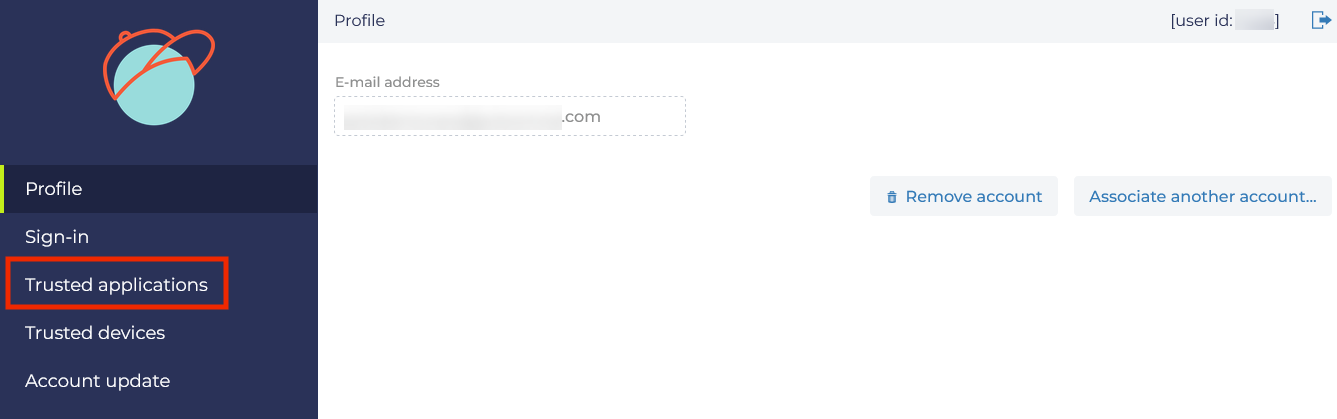
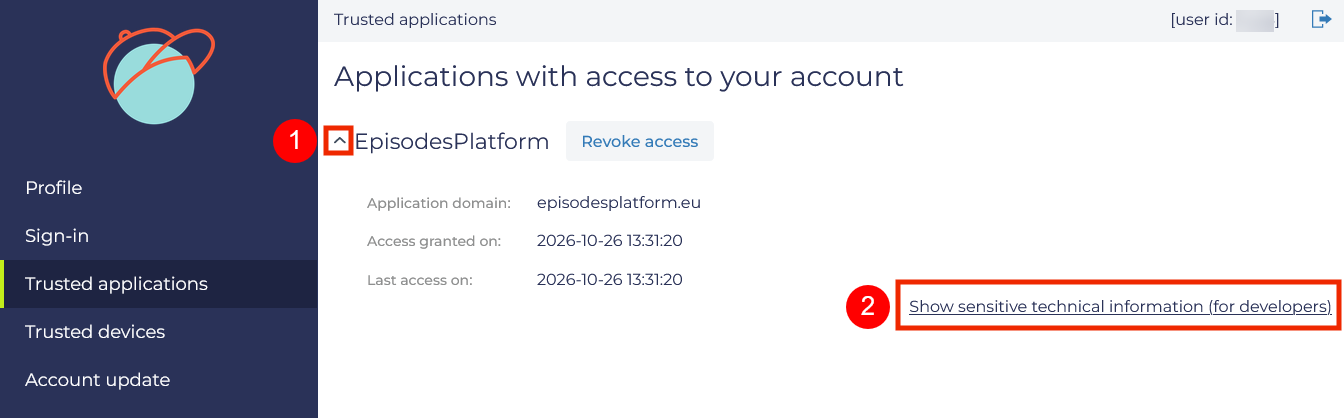
- Find EpisodesPlatform checking that Application domain is episodesplatform.eu. Expand it using the arrow next to its name (marked 1 below).
- Click Show sensitive technical information (for developers) (marked 2 below).
- Copy the value displayed next to Access token, highlighted below, and use it in the
Authorizationheader as described in the next section. Copy the token value only, without the issue or expiry dates.
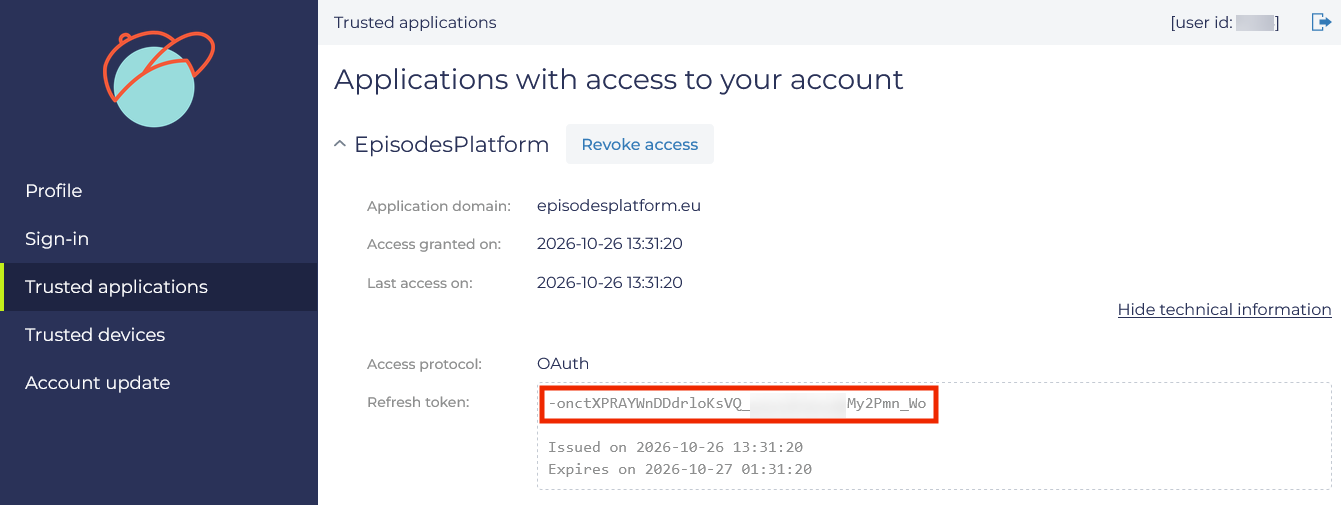
Use Access token, not Refresh token. Check Expires on beneath the access token to see when it expires. Token values in the screenshots have been obscured.
Send the token with a request
Send your token in the Authorization header over HTTPS:
http
Authorization: Bearer <ACCESS_TOKEN>Replace <ACCESS_TOKEN> in the examples with your current token. Send this header on each request that should use your account's permissions, and on every download request. Do not put the token in the request URL.
An empty, invalid or expired token returns 401. Check Expires on in Unity before using the token. An unsuccessful authentication attempt does not switch the request to anonymous access.
Find available search values
http
GET /api/epos/episode-elements/parametersUse this operation to discover the episode codes, data type names, countries and impacting factors that you can use in a file search. It returns possible search values, not files. For example, specifying an episode lets you check which types of data are available in that episode before requesting its file list.
The query parameters below act as filters that narrow the returned search values. All are optional. Without filters, the operation returns all available values. With filters, it returns values associated with the matching data. Supplying your token makes the operation use your account's permissions.
| Parameter | Required | Description |
|---|---|---|
episode | No | Return search values available for the specified episode for example BOBREK. |
dataType | No | Return search values available for the specified data type for example Catalog. |
country | No | Return search values available for data associated with the specified country for example Poland. |
impactingFactor | No | Return search values available for data associated with the specified activity for example underground mining. |
You can provide a list of values separated by commas, for example episode=BOBREK,ASFORDBY.
To list available search values without filters:
shell
curl --fail "https://episodesplatform.eu/api/epos/episode-elements/parameters"The response is a JSON object containing values for the parameters that can be used in the file search API. The following example is abbreviated; each array contains additional values:
json
{
  "countries": [
    "United States of America",
    "Uzbekistan",
    "United Kingdom"
  ],
  "episodes": [
    "ASFORDBY",
    "CZORSZTYN",
    "ST_GALLEN"
  ],
  "dataTypes": [
    "Injection Volume Multi",
    "Oil Production",
    "Periodic Gravimetric Measurements"
  ],
  "impactingFactors": [
    "underground gas storage",
    "wastewater injection",
    "reservoir impoundment"
  ]
}
To check available search values for BOBREK using your account's permissions:
shell
curl --fail -H "Authorization: Bearer <ACCESS_TOKEN>" "https://episodesplatform.eu/api/epos/episode-elements/parameters?episode=BOBREK"For example, the response below lists seven data types that can be used to search for files in BOBREK:
json
{
  "countries": [
    "Poland"
  ],
  "episodes": [
    "BOBREK"
  ],
  "dataTypes": [
    "Mine Area",
    "Ray Tracing Angles",
    "Mining Front Advance",
    "Velocity Model",
    "Miniseed Signal",
    "Seismic Network",
    "Catalog"
  ],
  "impactingFactors": [
    "underground mining"
  ]
}
Search for files
http
GET /api/epos/episode-elementsUse this operation to find files belonging to one or more episodes. You can narrow the results by data type, country, impacting factor and date range. Obtain the episode codes, data type names, countries and impacting factors from Find available search values.
The response contains file descriptions and download URLs. It does not contain the files themselves. Supply your token to search using your account's permissions, including any confirmed affiliations or researcher status.
| Parameter | Required | Description |
|---|---|---|
episode | Yes | Code of the episode for which you want to find files (e.g. CZORSZTYN). Available codes are returned by Find available search values. |
dataType | No | Type of data to search for (e.g. Catalog). Available types are returned by Find available search values. |
country | No | Country associated with the data you want to find (e.g. Poland). Available countries are returned by Find available search values. |
impactingFactor | No | Activity associated with the data you want to find (e.g. reservoir impoundment). Available values are returned by Find available search values. |
after | No | Start date of the period you want to search in YYYY-MM-DD format. Filters files by the start of their data time range. |
before | No | End date of the period you want to search in YYYY-MM-DD format. Filters files by the end of their data time range. |
The date filters select whole files using their metadata. They do not extract a selected time interval from the contents of a file.
You can provide a list of values separated by commas for episode, dataType, country and impactingFactor, for example episode=BOBREK,ASFORDBY.
To paginate results, also use the offset and limit parameters.
To find all seismic catalogues for the CZORSZTYN episode:
shell
curl --fail "https://episodesplatform.eu/api/epos/episode-elements?episode=CZORSZTYN&dataType=Catalog"The response is a JSON array containing descriptions of files matching the search criteria, in this example two seismic catalogues for CZORSZTYN. To download a file use its metadata.id or downloadUrl. The allowedDownload property may specify additional requirements that your account must meet; see Download permissions. If no files match, the response is [].
The example below shows selected metadata fields. Responses contain additional fields and some values may be null when information is unavailable.
json
[
  {
    "downloadUrl": "https://EpisodesPlatform.eu/api/epos/files/5cf0e9da-c6d4-304b-bcbc-2d9eb1d13ec3",
    "metadata": {
      "id": "5cf0e9da-c6d4-304b-bcbc-2d9eb1d13ec3",
      "fileName": "CZORSZTYN_relocation_TRMLOC_catalog.mat",
      "dataType": "Catalog",
      "episode": {
        "episodeCode": "CZORSZTYN",
        "episodeName": "CZORSZTYN: shallow water reservoir",
        "episodeStatus": null
      },
      "start": "2013-08-25T07:57:34.003Z",
      "end": "2016-11-22T22:17:03.003Z",
      "allowedDownload": [
        "all"
      ]
    }
  },
  {
    "downloadUrl": "https://EpisodesPlatform.eu/api/epos/files/9b29579b-46b4-31c3-b195-5cf8f5d54f6c",
    "metadata": {
      "id": "9b29579b-46b4-31c3-b195-5cf8f5d54f6c",
      "fileName": "CZORSZTYN_catalog.mat",
      "dataType": "Catalog",
      "episode": {
        "episodeCode": "CZORSZTYN",
        "episodeName": "CZORSZTYN: shallow water reservoir",
        "episodeStatus": null
      },
      "start": "2013-08-25T07:57:34.003Z",
      "end": "2022-01-19T00:38:25.003Z",
      "allowedDownload": [
        "all"
      ]
    }
  }
]
Some data in episodes such as 2020 Vendenheim Stimulation or 1993 Soultz-sous-Forêts Stimulation are restricted to users affiliated with academia. To download files subject to this restriction, supply an access token for an account with confirmed researcher status. See Download permissions.
Download permissions
A file can appear in your search results even when your account is not allowed to download it. Seeing its description and receiving a download URL do not grant download permission. The allowedDownload values explain who can download the file:
all: download is not restricted by project affiliation or researcher status. You must still supply a valid token, as explained in Download a selected file.academia: download is restricted to the research and academic community. Your account must have a confirmed researcher status; see Affiliations and researcher status.affiliated: download is restricted to users with a confirmed project affiliation. Researcher status alone does not meet this requirement.<project_identifier>or<project_work_package_identifier>: download is restricted to members of the specified project or project work package. Check your profile to see whether you are eligible to request that project affiliation; see Affiliations and researcher status.
If several values are listed in allowedDownload your account must match at least one of them. If your account does not meet the download requirements, the request returns 403.
Project affiliations and researcher status must be confirmed before they can be used to access restricted data.
Download a selected file
http
GET /api/epos/files/{fileId}
Authorization: Bearer <ACCESS_TOKEN>
To download a file use the downloadUrl or metadata.id returned by the file search API. If you use metadata.id substitute it for {fileId} in this endpoint. The identifier is not the file name.
This operation returns the file contents rather than metadata (in JSON format). A valid token is required for every download and your account must satisfy the file's download permissions. The token is not included in the download URL, so send the authentication header with the download request.
To download the relocated catalogue from the CZORSZTYN example above:
shell
curl --fail -H "Authorization: Bearer <ACCESS_TOKEN>" --output "CZORSZTYN_relocation_TRMLOC_catalog.mat" "https://episodesplatform.eu/api/epos/files/5cf0e9da-c6d4-304b-bcbc-2d9eb1d13ec3"The --output option saves the response to the specified local file. Run the command in the directory where you want to save it, or provide a path. An existing file at that path may be overwritten. The --fail option makes curl report HTTP errors instead of treating an error response as a successful download.
If the server returns 403, check Download permissions and the affiliations or researcher status confirmed for your account.
Errors
| Status | Meaning and action |
|---|---|
400 | Check the request parameters. File searches require an episode code, and date filters must use YYYY-MM-DD. |
401 | Supply a valid token. Downloads require one; an empty, invalid or expired token is rejected. Check the token's expiry date in Unity. |
403 | Download denied. Check the file's download requirements and your account's confirmed affiliations or researcher status. If you believe you have the required permissions, contact EPISODES Platform support. |
404 | The requested file or resource was not found. Check its identifier and search again if needed. |
422 | The requested limit exceeds the server's configured maximum. Use a smaller limit. |
500 | The server could not complete the request. If the problem persists, contact EPISODES Platform support. |
Error responses may contain text rather than the JSON used for successful searches. Check the HTTP status before processing a response or saving a download.
Use from scripts and request volume
You can make the same requests from your own scripts, for example using Python's requests library. Pass query parameters and the Authorization header, check the HTTP status, and save the response body when downloading a file.
A large number of API requests may cause your access to be blocked. If this happens, contact EPISODES Platform support using the contact form in the Platform's Support menu. Explain your use case and the amount of data you need. Whitelisting may be available for justified use cases.